 Help
Know where custom fields appear
Company custom fields appear in the Custom Fields section of an application’s Information tab. They also provide destinations for supported Facebook/webhook mappings and definitions for API integrations. A field belongs to the company where you create it.

Add a field
- As an administrator, open Settings → My Company → Custom Fields. For a linked carrier, use that carrier’s company workspace.
- Select Add field.
- Enter a clear Field name that tells your team what to record.
- Leave Field key blank to generate it from the name, or provide a stable key for integration use.
- Choose the Type. For Single Select or Multi Select, add at least one option.
- Choose Required and a numeric Sort order appropriate for the team’s workflow.
- Save, open an application for the same company, and check the field in its Custom Fields section.
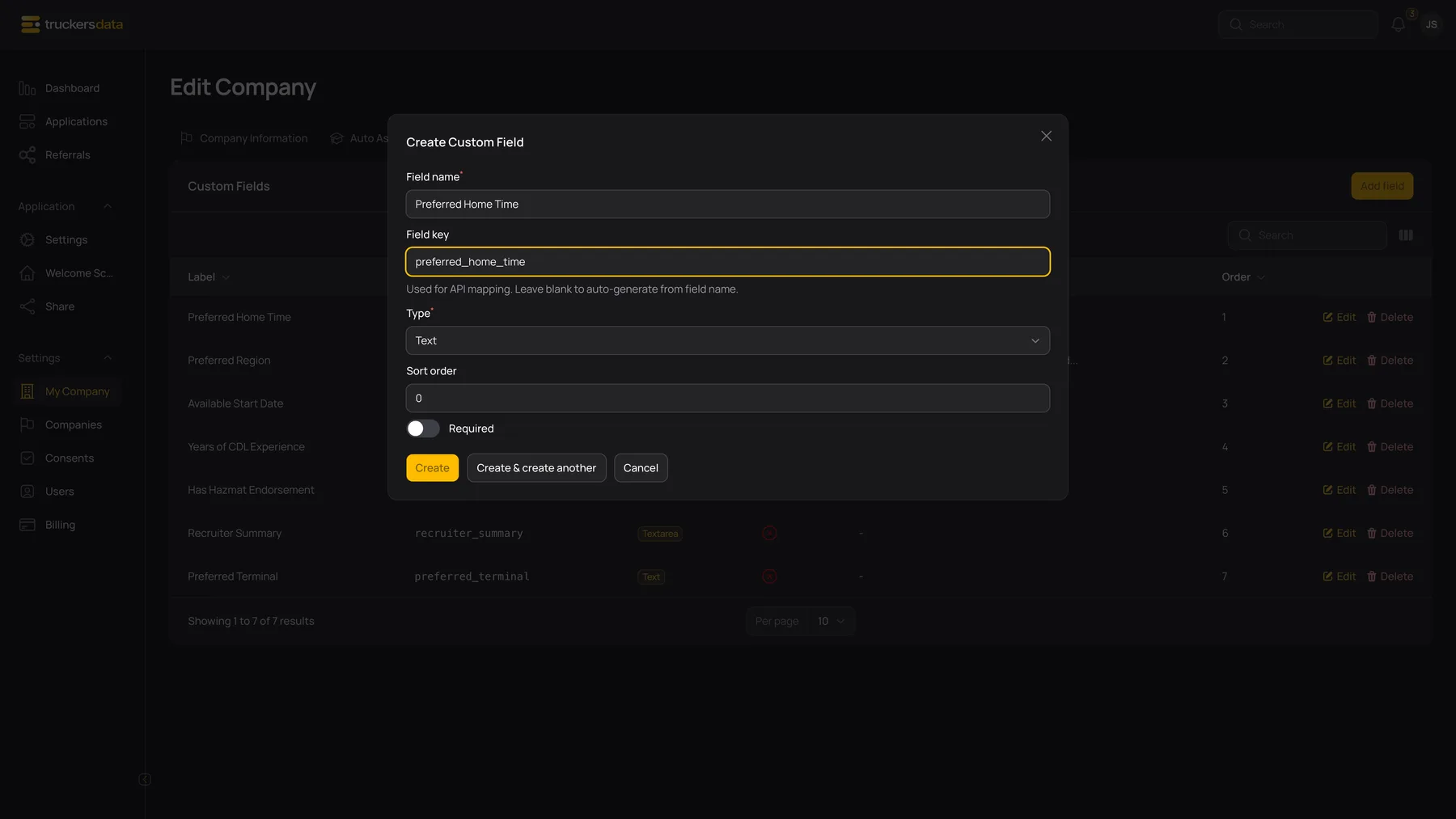
Definition fields and controls
| Field or button | What it does |
|---|---|
| Field name | The label staff see in the application editor and mapping choices. A name is required. |
| Field key | The integration identifier. A blank key is generated from the name. Keys are normalized and made unique within the company, so copy the final saved key from the list. |
| Type | Determines which input appears on the application and which incoming values are appropriate. |
| Options | Appears for Single Select or Multi Select. Add distinct choices your team should use; blank options do not provide a meaningful choice. |
| Add option | Adds another dropdown choice. It does not add a second custom field. |
| Sort order / Order | Controls the field’s position relative to other company fields. Lower values sort before higher values. |
| Required | Makes the internal application editor require a value before saving. It does not backfill old records or publish a new public question. |
| Edit | Changes the definition. Review existing application values and integration mappings after a structural change. |
| Delete | Removes the definition from the active editor and mapping choices. It does not rewrite already generated application or consent PDFs. |
Choose a type that matches the information
| Field or button | What it does |
|---|---|
| Text | One short answer, such as a preferred terminal or an external reference. |
| Textarea | A longer internal note or summary. It uses more space in the application editor. |
| Number | A numeric answer, such as years of experience. Letters and free-form explanations belong in text fields. |
| Date | A date answer selected through the date picker. |
| Yes / No | A two-choice boolean answer. Use it for a clear yes/no question rather than a multi-stage status. |
| Single Select | One choice from the options you define. |
| Multi Select | More than one choice from the options you define. |

Fill a value on an application
Open the company’s application, remain on Information, and find Custom Fields. Fill the displayed inputs and save the application. Required definitions can prevent saving an existing record until a value has been supplied, even when that record predates the field.
An administrator can change definitions; an ordinary user with application access works with the fields on the application rather than managing the company’s definitions. If a field is missing, check the application’s company and the field’s owner before creating a duplicate definition elsewhere.

Before changing keys, types, options, or Required
Changing a label changes how the definition is displayed. Changing a key changes the identifier the editor and integrations look up; it does not rename all previously saved answers or automatically update external field mappings. Prefer stable keys once a field is in use.
Changing the type or options does not convert every older answer into the new format. Test an existing application and check how its saved answer appears before making a broad change. Turning Required on can require staff to complete that field when they next save an old application; it does not contact the applicant or collect an answer automatically.
After a change, reopen the relevant Facebook mappings or webhook mappings, check the destination, and run a controlled test. A field definition’s required flag does not automatically become a required incoming custom-answer rule.
Custom-field questions
| Field or button | What it does |
|---|---|
| Why can’t the driver see my new field? | These definitions are internal/integration fields in this version. They do not extend the public wizard. |
| Why is an older application now asking for a value? | A Required definition applies when the internal editor is saved, including older applications. |
| Why is my key different after saving? | The name/key was normalized or a suffix was added to keep it unique in this company. Use the saved key. |
| Why did an integration value not appear? | Check the company, target key, mapping, and imported value type. Review the application itself after testing. |
| Why does the API show an older value? | An existing internal-editor value can take precedence over an API-stored fallback value in this version. Compare the returned value with the application editor and contact support before relying on automatic overwrites. |